
GUIDE #301
How to Play Sketch Pehchan Online
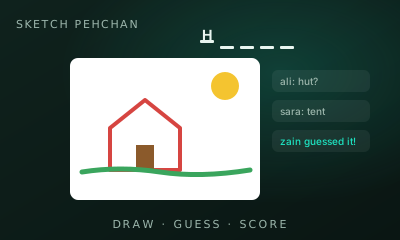
Sketch Pehchan is a draw-and-guess party game: one player draws a secret word and everyone else races to guess it. Play online with 2–8 friends, pass one phone around in Local vs, or guess the computer’s drawings solo. Faster guesses score more.
01 // CONTROLS
Controls
- Drawer: draw with a mouse, pen or finger; pick a colour, brush size, eraser or fill; Undo and Clear
- Guessers: type a guess and press Enter (or Send)
- Local vs: say guesses out loud; the drawer taps the name of whoever got it
- Phone and tablet work in portrait or landscape
02 // STEPS
Step by step
- 01
Choose a mode
Create room: share the invite link or code and approve each friend who asks to join (people only). Local vs: type 2–8 names and pass one device around. Play vs Computer: the computer draws, you guess.
- 02
Pick a word
On your turn you get three words and 15 seconds to choose one. Nobody else sees them.
- 03
Draw it
You have the draw time the host set (45–120 s; default 80). Letters and numbers drawn as text spoil the fun, so sketch.
- 04
Guess it
Everyone else types guesses. A right answer is hidden from the others; a one-letter-off guess gets a private “close!” nudge. Letter hints appear as time runs down.
- 05
Score
Guessers score 50–300 points, more for guessing sooner. The drawer gets 50 for each player who guesses it.
- 06
Local vs: pass the device
A “Hand the device to …” screen hides everything. The drawer picks a word in private, taps “Pass to guessers”, then draws while everyone shouts guesses. The drawer taps each player who says it (tap again to undo); press and hold “Peek” to see the word again.
- 07
Teams 2 v 2
With exactly 4 players, the host can turn on Teams (Red v Blue) and choose the pairs. One player draws, only their teammate can guess, and the other team watches without guessing. Then the other team plays, and the drawer rotates so both teammates draw. Team points add up and the higher team wins.
- 08
vs Computer
The computer picks a word and sketches it stroke by stroke. Type your guesses as normal, with the same timer and hints; 3 drawings per round. If time runs out (or you tap Pass) the computer scores 150.
03 // EDGE
Pro tips
- Draw the big shape first, details later.
- Guess often: wrong guesses cost nothing.
- Watch the letter count and hints.
04 // FAQ
Sketch Pehchan FAQ
Can I use my own words?
Yes. The host can paste a custom word list (at least 3 words) in the room rules, and can choose to use only those words.
Can I play against the computer?
Yes. Choose Play vs Computer: the computer draws its own sketches and you guess them. (It doesn’t guess your drawings.)
Can we play on one phone?
Yes. Local vs is a pass-the-phone party mode for 2–8 named players: the word stays hidden until the drawer has the device, and guesses are said out loud.
Is Sketch Pehchan free to play in the browser?
Yes. Sketch Pehchan on My MP Games is free HTML5 — no download, no account, and no paywall.
Can I play Sketch Pehchan vs the computer?
Open the play page and choose Play vs Computer. You can also play Local vs on one device or share a room code with a friend.
Where are the Sketch Pehchan rules?
Sketch Pehchan is a draw-and-guess party game: one player draws a secret word and everyone else races to guess it. Play online with 2–8 friends, pass one phone around in Local vs, or guess the computer’s drawings solo. Faster guesses score more.