Play 2 Player Chess Online, Free in Your Browser
Looking for 2 player chess online with no app and no sign-up? My MP Games runs full-rules chess in any modern browser. Send a friend a room code and play live on two devices, pass one phone or laptop back and forth, or warm up against a computer that ranges from Beginner to Expert. Every move is checked for legality, the move list is written in standard notation, and optional clocks run from 1+0 bullet to 15+10. It works on desktop, tablet and mobile, it is free, and you can start a game in a few seconds.
How to Play
Choose a Mode
Pick Create room to invite a friend, Join room if you already have a code, Local vs to share one screen, or Play vs Computer for an instant solo game.
Set the Match
The host chooses the time control (no clock, 1+0, 3+2, 5+0, 10+0 or 15+10), which colour to play (White, Black or Random) and whether move hints are shown. Online, these room rules lock once play starts, so both players know exactly what they agreed to.
Make Your Moves
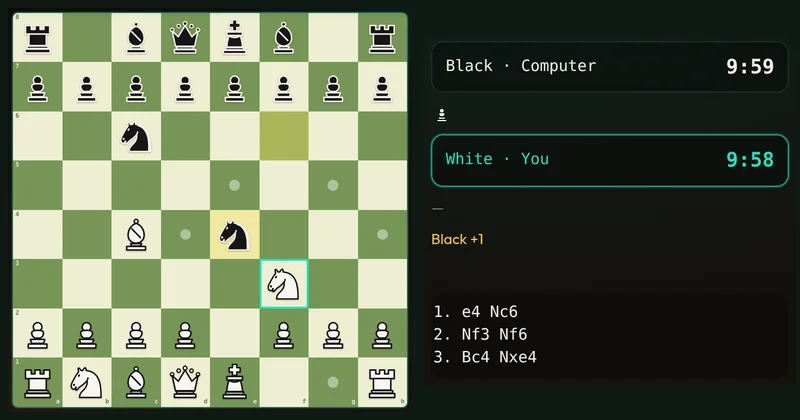
White moves first. Tap or click a piece and its legal squares light up, then tap a highlighted square. You can also drag the piece. When a pawn reaches the last rank, a picker lets you promote to a queen, rook, bishop or knight.
Chess Rules
- Each side starts with 16 pieces: a king, a queen, two rooks, two bishops, two knights and eight pawns.
- Castling, en passant and promotion are all supported. Castling is only allowed when the king and rook haven't moved and the king isn't in, through or into check.
- Illegal moves are refused, and a short tip explains why, so beginners learn as they play.
- You win by checkmate, when your opponent resigns, or when their clock runs out.
- The game is drawn by stalemate, threefold repetition, the fifty-move rule, insufficient material or an agreed draw.
Controls
Mouse and Keyboard
Click a piece, then click its destination, or drag and drop it. Side-panel buttons let you flip the board, switch sound on or off, resign, and offer or accept a draw.
Touch (Phone and Tablet)
Tap a piece and then a highlighted square, or drag it with your finger. The 8×8 board keeps its squares even on a narrow phone screen, and files a–h and ranks 1–8 stay labelled.
Game Modes
Online With a Friend (Room Code)
Choose Create room and share the code or link. Your friend joins from their own browser, with no account, and the server keeps the clocks so both screens agree. This is the simplest way to play chess with friends online. You can also challenge players who are free in the arena.
Local 2 Player on One Device
Pick Local vs and take turns on the same phone, tablet or computer. Turn on auto-flip and the board rotates after every move so each player sees it from their own side. Undo takes back the last move.
vs Computer
Choose a level from Beginner, Easy, Medium, Hard or Expert, and play as White, Black or Random. The engine thinks in a background worker, so the page never freezes, and Undo takes back your move and the computer's reply.
Hill Chess Variant
Pick Hill Chess in the variant list for King of the Hill: checkmate still wins, and so does walking your king to d4, d5, e4 or e5.
Tips and Strategy for 2 Player Chess Online
- Control the centre. Open with a centre pawn and bring your knights and bishops towards the middle.
- Castle early. A castled king is much harder to attack, and it connects your rooks.
- Check every threat. Before each move, ask what your opponent's last move attacks.
- Count captures. Look at the material display before you trade, and don't give a piece away for a pawn.
- Pick a fair clock. With a newer player, choose No clock or 15+10. Save 1+0 and 3+2 for quick rematches between equals.
- Use the computer as a coach. Start on Beginner, step up a level when you win comfortably, and use Undo to try a better move.
A Short History of Chess
Chess grew out of chaturanga, a game played in India around the sixth century. It travelled to Persia as shatranj and then into Europe, where the modern, more powerful queen and bishop appeared in the late fifteenth century. Players kept games going by post for centuries, and the internet turned that into live play between friends anywhere. In 1997 IBM's Deep Blue beat world champion Garry Kasparov, and strong engines are now built into everyday apps. Today a game between two friends needs nothing more than a browser and a room code.
Chess FAQ
How do I play chess with a friend online?
Open Chess, choose Create room and send your friend the code or link. They join from any browser with no account, and you play live on your own devices.
Can 2 players play chess on the same device?
Yes. Choose Local vs and take turns on one phone, tablet or computer. Turn on auto-flip and the board rotates after every move so each player sees it from their side.
Is 2 player chess online free?
Yes. Chess on My MP Games is free, with no download, no app and no account. It runs in mobile and desktop browsers.
Can I play chess against the computer?
Yes. Pick Play vs Computer and choose Beginner, Easy, Medium, Hard or Expert. The engine thinks in a background worker, so the board never freezes.
Are chess clocks available?
Yes. Choose No clock, 1+0, 3+2, 5+0, 10+0 or 15+10. In online games the server keeps the time, so both screens agree.
Can I undo a move?
In Local vs and vs Computer, yes. Undo takes back the last move, or your move and the computer's reply. Online games have no undo, but you can offer a draw or resign.
How does a pawn promote?
When a pawn reaches the last rank, a picker appears and you choose a queen, rook, bishop or knight.
What is Hill Chess?
Hill Chess is the King of the Hill variant. Checkmate still wins, and so does walking your king onto d4, d5, e4 or e5.
More Board Games for Two
Looking for something else to play? Try more 2 player games online, checkers online with friends, Othello game online, Go board game online or backgammon online free.